Declarative Device Management vs Traditional MDM: What Changes and What You Do About It

Apple announced at WWDC 2025: traditional MDM software update commands are deprecated. They will be removed in 2026. If you manage Macs or iOS devices through JAMF Pro, Intune, Mosyle, or any MDM solution, this affects your workflows.
This is not a minor API change. It represents a fundamental shift in how Apple expects devices to be managed. The server stops telling devices what to do. Instead, devices receive a desired state and figure out how to achieve it themselves.
This article explains what DDM is, how it differs from traditional MDM, and the specific steps you need to take before the 2026 deadline.
The Problem DDM Solves
Traditional MDM follows a command-and-control model. Your MDM server sends a command. The device executes it. The device reports back. The server sends another command. This cycle repeats constantly.
For software updates, traditional MDM works like this:
- Server polls device for current OS version
- Server determines an update is needed
- Server sends update command
- Device downloads the update
- User gets a 60-second countdown (often unexpected)
- Device installs and reports back
- Server polls again to confirm
This model creates problems at scale.
Server load. Every device checks in at intervals. A fleet of 1,000 Macs checking in every 15 minutes generates 96,000 server requests per day. Your MDM server becomes a bottleneck.
Offline devices. When a Mac loses connectivity, it misses commands. The device drifts from your desired configuration until it reconnects and catches up. You have no visibility into compliance during the offline period.
User experience. The 60-second countdown appears without warning. Users lose unsaved work. Deferral behavior is inconsistent. Help desk tickets increase.
Latency. Changes propagate slowly. You push a security policy. Some devices receive it in minutes. Others take hours, depending on check-in schedules and network conditions.
Apple built DDM to address these problems.
What DDM Does Differently
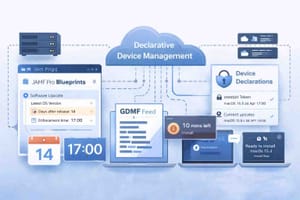
Declarative Device Management shifts responsibility from the server to the device. Instead of receiving commands, the device receives declarations describing the desired end state. The device then enforces and maintains the state autonomously.
The server declares: "This device should run macOS 15.2 or higher by January 15."
The device handles everything else. It schedules the download. It notifies the user. It tracks the deadline. It installs the update. It reports completion.
The server does not poll. The server does not send follow-up commands. The device operates independently until the state is achieved.
Three Pillars of DDM
DDM consists of three components: declarations, status channels, and extensibility.
Declarations
Declarations define desired states. They are JSON objects (not plists) describing what a device should look like.
Four declaration types exist:
Configuration declarations apply policies. Wi-Fi settings, VPN configurations, passcode requirements, software update targets. These replace traditional configuration profiles for supported features.
Asset declarations provide supporting data. Certificates, credentials, identity information. Multiple configurations reference the same assets, reducing duplication.
Activation declarations determine when configurations apply. You define conditions. A configuration activates only when the device meets those conditions. For example: apply this policy only to devices running macOS 14 or later.
Management declarations contain metadata about the MDM environment. Organization information, server capabilities, enrollment details.
Declarations live on the device. The device evaluates them locally and enforces them without waiting for server instructions.
Status Channels
Status channels replace polling. Devices report state changes asynchronously. When something changes, the device notifies the server. When nothing changes, the device stays silent.
Your MDM server subscribes to specific status items. OS version. Compliance state. App installation status. The device sends updates only for subscribed items, only when changes occur.
This reduces network traffic and server load while providing faster visibility into fleet status.
Extensibility
Extensibility allows DDM to evolve. When a device OS updates and gains new DDM features, the device reports those capabilities to the server. When your MDM solution adds new declaration types, the server reports those to devices.
Both sides communicate supported features. This enables gradual adoption of new functionality without breaking existing configurations.
What Apple Is Deprecating
At WWDC 2025, Apple deprecated the following for software update management:
- MDM software update commands
- The com.apple.SoftwareUpdate configuration profile payload
- MDM update queries
- Restrictions-based update deferrals
These mechanisms continue to function in current OS versions. They will be removed entirely in the 2026 OS releases (macOS 27, iOS 27).
After removal, any workflow relying on these commands will fail silently. Your MDM will send commands. Devices will ignore them. Updates will not happen.
DDM Software Updates: How They Work
DDM software updates use enforcement deadlines. You declare a target OS version and a deadline. The device handles user communication and installation.
Days before deadline: The device displays notifications reminding the user to update. Frequency increases as the deadline approaches.
At deadline: If the user has not updated, the device forces the update. No 60-second countdown. No deferral option. The update happens.
After completion: The device reports the new OS version through the status channel. Your MDM receives confirmation without polling.
This model provides predictable compliance. You set a deadline. Devices meet it. No chasing stragglers.
What DDM Covers Today
DDM support has expanded since its introduction in iOS 15. As of macOS 15 and iOS 18, DDM handles:
Software updates. Target versions, deadlines, deferral periods, notification settings.
Passcode policies. Complexity requirements, expiration, history.
App management. Version pinning for App Store apps, automatic updates, app configurations.
Safari management. Bookmarks, homepage, extensions.
Account configurations. Mail, calendar, contacts.
Certificates and identities. Trust anchors, identity certificates.
Restrictions. A growing subset of traditional restrictions now have DDM equivalents.
Not everything has migrated to DDM. Many configuration profile payloads still require traditional MDM. Apple adds DDM parity with each OS release.
DDM and Traditional MDM Coexist
DDM does not replace your entire MDM infrastructure. It augments it.
Your MDM solution handles enrollment, app deployment, remote wipe, device queries, and configuration profiles for features lacking DDM support. DDM handles software updates, specific configurations, and status reporting for supported features.
JAMF Pro 11+, Intune, Mosyle, Kandji, and other major MDM solutions already support DDM. They present a unified interface. You configure policies. The solution determines whether to use DDM declarations or traditional profiles based on the feature and target OS version.
You do not write JSON declarations manually. Your MDM translates your policy settings into the appropriate format.
The Transition Timeline
Now through Q1 2026: Both models work. You should configure DDM-based software updates and test them alongside existing workflows.
Q2 2026: Apple releases macOS 27 and iOS 27 betas. Legacy software update commands stop working in beta builds. Test your fleet management against betas.
Fall 2026: macOS 27 and iOS 27 release to production. Legacy software update commands are removed. Any workflow still using them fails.
You have until September 2026 to complete migration. Eight months from now. For large fleets, this timeline is tight.
What You Need to Do
Step 1: Audit Current Software Update Workflows
Identify how you currently push updates. In JAMF Pro, check:
- Software Update policies using MDM commands
- Configuration profiles with the Software Update payload
- Patch management workflows using the "Download and Install" action
- Any scripts calling
softwareupdatethrough MDM
Document what exists. You need to replace each workflow with a DDM equivalent.
Step 2: Verify MDM Solution DDM Support
Confirm your MDM version supports DDM software updates. For JAMF Pro, version 11.0 or later includes DDM support. Older versions require upgrades.
Check your MDM vendor's documentation for:
- DDM software update enforcement
- Deadline configuration
- Notification customization
- Status reporting
If your MDM lacks DDM support, you have a vendor problem requiring immediate attention.
Step 3: Create DDM Software Update Configurations
In JAMF Pro, DDM software updates are configured through Managed Software Updates. The workflow:
- Navigate to Computers > Managed Software Updates
- Create a new configuration
- Set target OS version (specific version or "latest")
- Set enforcement deadline (date and time)
- Configure local notification settings
- Scope to a Smart Group
The device handles everything after receiving the declaration.
Step 4: Test on Pilot Devices
Do not deploy DDM updates fleet-wide without testing. DDM behavior differs from traditional MDM in ways affecting user experience.
Create a pilot group including:
- Different Mac models (Intel if you still have them, various Apple Silicon)
- Different OS versions (current and one version back)
- Different user types (power users, standard users, shared devices)
Monitor the pilot for:
- Notification timing and frequency
- Deadline enforcement behavior
- Reboot handling
- Edge cases (low disk space, battery issues, network constraints)
Run the pilot for at least two update cycles before expanding.
Step 5: Migrate Production
After validating pilot results, migrate production in phases. Do not switch the entire fleet simultaneously.
Phase 1: IT staff and early adopters (people who will report issues) Phase 2: Standard users in low-risk departments Phase 3: Remaining standard users Phase 4: Executive and high-profile users (last, after you've resolved edge cases)
Step 6: Remove Deprecated Configurations
After confirming DDM updates work in production, remove legacy configurations:
- Delete Software Update configuration profiles
- Disable MDM command-based update policies
- Remove any scripts using legacy update mechanisms
Leaving both active creates confusion and potential conflicts.
JAMF Pro Specifics
JAMF Pro 11 introduced DDM support. JAMF Pro 11.5+ includes enhanced DDM features for software updates.
Managed Software Updates is the JAMF Pro interface for DDM software updates. It supports:
- Target version specification (exact version or latest available)
- Enforcement deadlines with date and time
- Deferral periods before deadline enforcement
- Notification customization
- Scope via Smart Groups or individual devices
DDM Status Reporting provides real-time visibility. Devices report update progress without polling. JAMF Pro displays:
- Devices pending update
- Devices downloading
- Devices scheduled for installation
- Devices completed
Smart Groups work with DDM status. Create groups based on OS version criteria. Devices automatically move between groups as they update. Scope DDM configurations to these groups for automated targeting.
Common Issues and Solutions
Issue: Users complain about aggressive notifications.
DDM notifications are persistent by design. Users receive reminders starting several days before the deadline. If users find this disruptive, extend your deadline window. A 7-day window provides more gradual notification escalation than a 48-hour window.
Issue: Devices fail to update at deadline.
Check for blocking conditions: insufficient disk space, enrollment profile issues, network restrictions preventing Apple update server access. DDM status reporting shows devices failing to comply. Investigate individually.
Issue: Mixed fleet with older OS versions.
DDM software updates require macOS 14+ and iOS 17+ for full functionality. Devices running older OS versions need traditional MDM commands to reach DDM-compatible versions first. Plan a two-phase approach: legacy MDM to reach minimum version, then DDM for ongoing management.
Issue: Shared Macs or lab environments.
DDM works on shared Macs but deadline enforcement interrupts active sessions. Schedule deadlines during maintenance windows. Use activation declarations to apply configurations only during specific hours if your MDM supports time-based predicates.
Why This Matters Beyond Compliance
The DDM migration is not optional. Failing to migrate means losing software update management in late 2026. But the benefits extend beyond avoiding breakage.
Faster security response. When Apple releases an emergency patch for an actively exploited vulnerability, DDM enforcement ensures devices update within your specified deadline. No waiting for check-ins. No chasing stragglers. You set 48 hours. Devices comply within 48 hours.
Reduced server infrastructure. DDM's asynchronous model reduces MDM server load. Devices report changes instead of polling constantly. For large fleets, this translates to measurable infrastructure savings.
Better offline handling. Devices maintain state when disconnected. A Mac offline for a week still enforces its declared software update policy when reconnected. The device knows the deadline and acts accordingly.
Improved user experience. Notifications replace surprise reboots. Users see updates coming. They choose when to install within your deadline window. Forced updates only happen when users ignore repeated warnings.
Next Steps
- Verify your MDM solution version supports DDM software updates.
- Audit existing software update workflows in your environment.
- Create a DDM software update configuration targeting your current OS version.
- Deploy to a pilot group of 10-20 devices representing your fleet diversity.
- Monitor for two weeks. Document issues.
- Expand to production in phases over 60-90 days.
- Remove deprecated configurations after confirming DDM works.
- Complete migration by July 2026 to allow buffer before the September OS releases.
Start this week. The timeline is shorter than it appears.
Published by MacJediWizard Consulting